WebSockets Demystified: Real-Time Communication, Design Trade-offs, and Scaling Tips
WebSockets demystified: why they exist, how bi-directional real-time communication works, and the trade-offs that matter when scaling WebSockets in production.
In the era of real-time experiences—live chats, multiplayer games, collaborative tools, and financial dashboards—users expect instantaneous feedback. Traditional HTTP-based APIs (like REST) fall short for these dynamic interactions. That’s where WebSockets come in: they enable bi-directional, low-latency, persistent connections that allow servers and clients to talk to each other in real-time.
But like any powerful tool, WebSockets come with architectural trade-offs and scaling challenges. In this article, we’ll explore:
- Why WebSockets are needed
- How they work
- Real-world use cases
- How they differ from other web paradigms
- Important design and scaling considerations for production systems
⚡ Why Do We Need WebSockets?
Most traditional web apps use HTTP with a request-response model: the client requests data, the server responds, and the connection closes. This model is stateless and one-way. It doesn’t work well when:
- The server needs to proactively send updates (e.g. chat messages, game state changes).
- You want to reduce latency and bandwidth overhead caused by repeated polling.
- You’re handling high-frequency, real-time interactions between users or systems.
Before WebSockets, devs used:
- AJAX polling – frequent XHR calls; simple but inefficient.
- Long polling – the server holds the response until new data is available; more efficient, but still clunky.
- Server-Sent Events (SSE) – unidirectional server-to-client updates over HTTP; simpler but limited.
These were workarounds. WebSockets were purpose-built for real-time, full-duplex communication.
How WebSockets Work
- Handshake: The client initiates an HTTP request with an
Upgrade: websocketheader. - Protocol Upgrade: The server responds with
101 Switching Protocols, and the TCP connection is upgraded to WebSocket. - Bi-directional Streaming: The connection stays open. Both client and server can send messages at any time in lightweight frames.
- Connection Management: Either side can close the connection explicitly or upon timeout/errors.
Basic WebSocket Example (Client-side)
const socket = new WebSocket("wss://example.com/socket");

socket.onopen = () => {
  socket.send("Hello Server!");
};

socket.onmessage = (event) => {
  console.log("Server says:", event.data);
};

socket.onclose = () => {
  console.log("Connection closed");
};
Real-World Applications
- Notification systems – live alerts, badges, reminders
- Chat apps & messaging platforms
- Multiplayer games & collaborative editing
- Live financial dashboards
- IoT device streams
- AI-driven assistants with streaming responses
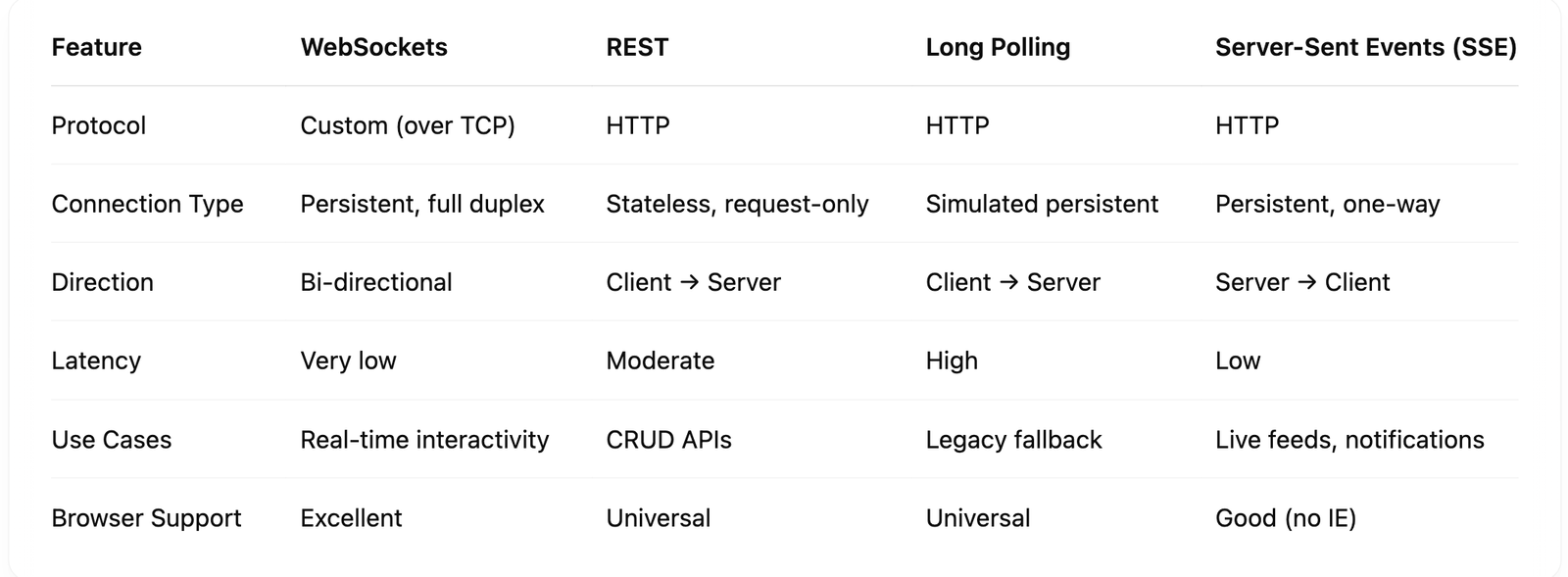
WebSockets vs REST vs Long Polling vs SSE
Design Considerations & Bottlenecks
Real-time apps are exciting—but they come with non-trivial design and scaling challenges. Here are the key things to keep in mind:
1. Connection Scalability
Each WebSocket connection consumes server resources (file descriptors, memory, thread contexts). Unlike REST, which is stateless and short-lived, a WebSocket connection is long-lived.
Problem:
Handling 100K+ simultaneous connections on a single server becomes resource-intensive.
Solution:
- Use event-driven servers like Node.js, Go, or Elixir/Phoenix Channels for efficient async I/O.
- Deploy a WebSocket gateway layer using tools like NGINX with
streammodule, HAProxy, or Envoy. - Horizontally scale using a load balancer or reverse proxy.
2. Message Routing (Pub/Sub)
When you have multiple app servers, a client connected to Server A might need to receive a message initiated by Server B.
Solution:
- Use a Pub/Sub system (e.g., Redis Pub/Sub, NATS, Kafka) to broadcast events between app servers.
- Introduce a stateful connection router or use sticky sessions (though not ideal for autoscaling).
3. Connection Lifecycle & Cleanup
Dropped connections can lead to zombie sockets if not handled correctly.
Solution:
- Set ping/pong heartbeats to detect and close dead connections.
- Use idle timeouts to clean up inactive clients.
- Monitor connection health via metrics and logs.
4. Security Considerations
WebSockets bypass some of the familiar HTTP security layers.
Recommendations:
- Always use WSS (WebSocket over TLS).
- Authenticate during or right before the handshake (JWT tokens, signed cookies).
- Implement rate limiting and message validation to prevent abuse or injection attacks.
5. Observability
You can’t improve what you don’t measure.
Track:
- Active connections
- Connection duration
- Messages sent/received
- Errors and reconnect attempts
- Message latency and delivery time
Use tools like Prometheus, Grafana, or Datadog to set up dashboards and alerts.
6. Session Persistence
If your app requires knowing who is connected, you’ll need session storage.
Options:
- Store active socket-client metadata in Redis.
- Tag connections with user/session IDs during handshake.
- On reconnect, allow resuming sessions gracefully.
Capacity Planning Tips
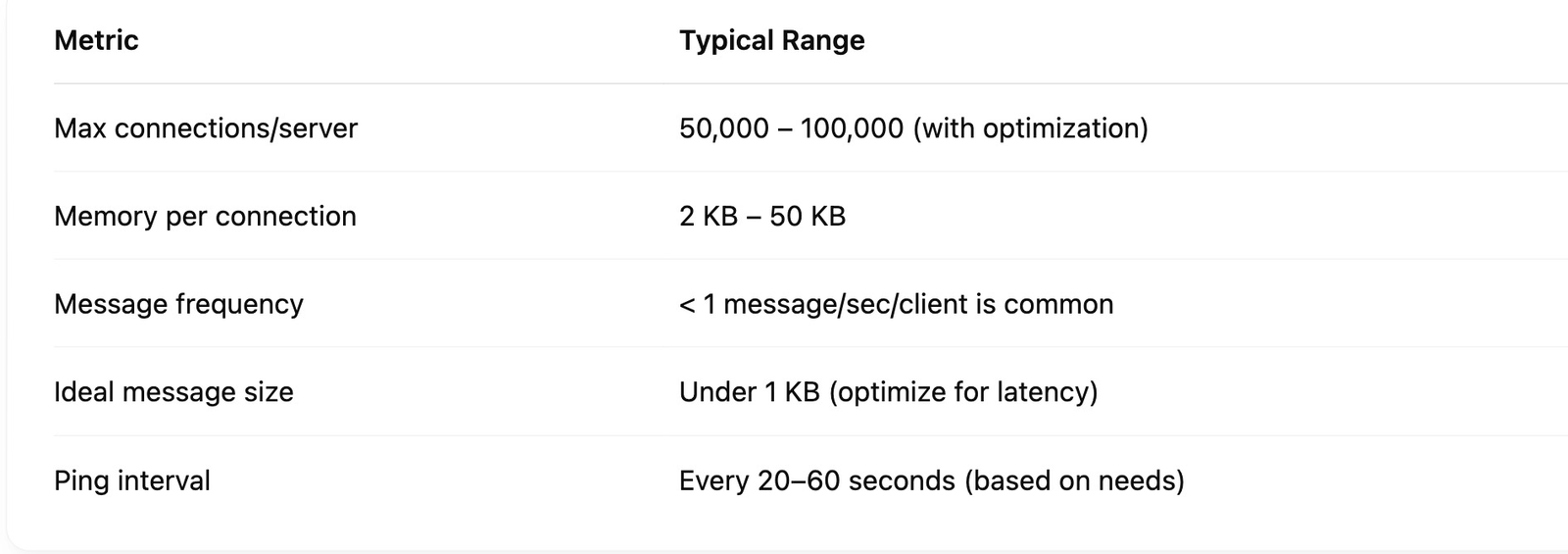
Plan your infrastructure based on expected connection count, message frequency, and data size.
When Not to Use WebSockets
- ❌ Your app only needs occasional updates (stick with REST or polling).
- ❌ You need to scale effortlessly with stateless HTTP/CDNs.
- ❌ You require reliable delivery, ordering, and durability (consider gRPC or message queues).
Summary
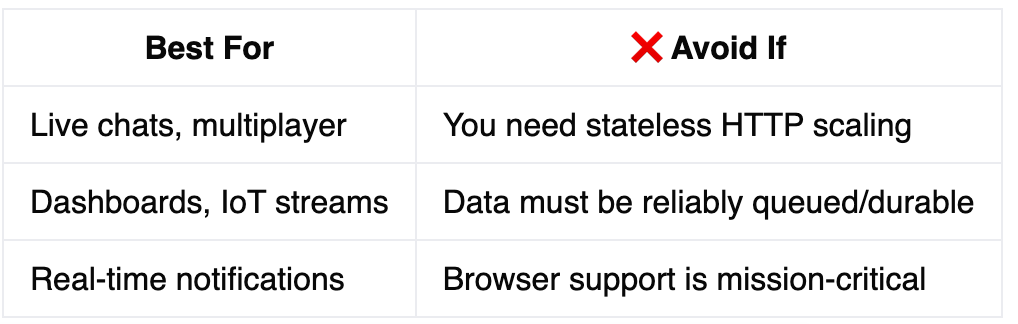
WebSockets are a powerful tool for real-time interactivity, but require thoughtful architecture when scaling. Here's a recap:
More like this
Concurrency vs. parallelism explained with Python: how the GIL, threading, asyncio, and multiprocessing work, and when to choose each for system design.
How Bloom filters trade certainty for speed and space in system design, why that trade-off matters, and where to use this probabilistic data structure.
A tour through the evolution of databases, from flat files to relational, NoSQL, and NewSQL systems, with lessons on why modern database designs work this way.