Scaling Kafka - Part 1 : Choosing the Right Number of Kafka Partitions
How to choose the right number of Kafka partitions: balancing write throughput, consumer parallelism, and operability when scaling a Kafka deployment.
Introduction
Kafka partitions are the unit of parallelism for both producers and consumers. The right partition count determines:
- ✅ Maximum write and read throughput
- ✅ Parallelism for consumers
- ✅ Resilience and failure recovery speed
- ⚠️ Broker memory and metadata pressure
- ⚠️ Latency and rebalancing cost
Goal: Balance Throughput, Parallelism, and Operability
Choosing the right number of partitions is a balancing act. You want enough partitions to:
- Handle expected and bursty producer throughput
- Serve enough consumers concurrently without contention
- Ensure ordering guarantees for message keys that need it
...but not so many that:
- Broker memory is overwhelmed
- Rebalancing becomes painfully slow
- Metadata bloat stresses ZooKeeper or KRaft
Key Formula (Throughput-Driven)
required_partitions = ⌈ total_ingestion_rate / max_throughput_per_partition ⌉
Where:
total_ingestion_rate= e.g., 200 MB/smax_throughput_per_partition= e.g., 10 MB/s (based on benchmarking)
If you ingest 200 MB/s and each partition can handle ~10 MB/s, you need at least 20 partitions.
This formula gives you a starting point based on raw throughput needs. You still need to factor in consumer behavior and key distribution.
Alternative Formula (Consumer-Driven)
required_partitions = ⌈ total_ingestion_rate / per_consumer_processing_rate ⌉
This version focuses on how fast your consumers can drain data.
For example:
- Producer: 100,000 msgs/sec
- Each consumer: 1,000 msgs/sec → need 100 consumers → need ≥100 partitions
Bonus consideration:
If your consumers are CPU or IO bound, you may need even more partitions to prevent lag buildup.
Rule of Thumb for Partitions
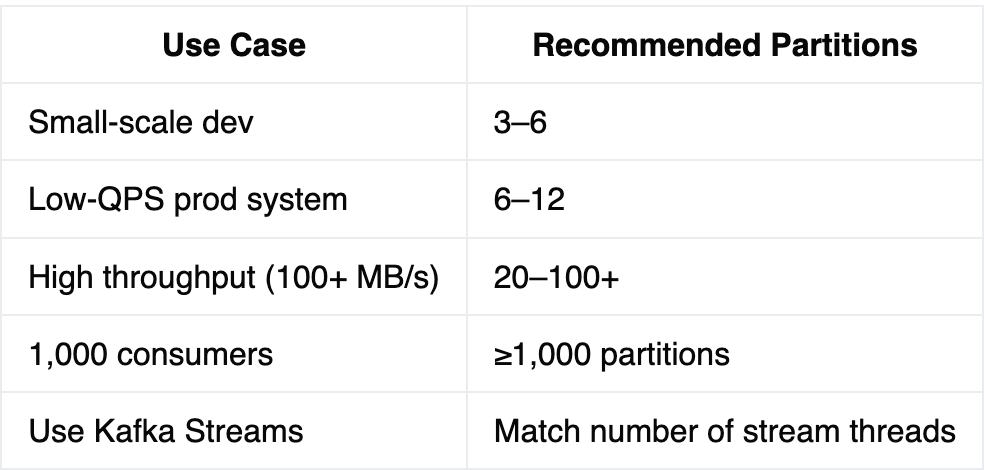
Always round up if in doubt — under-partitioning is harder to fix post-facto.
Note: You can increase partitions after topic creation (but rebalancing is disruptive and ordering per key is not guaranteed across new partitions).
Tradeoffs of High Partition Counts
| Pros | Cons |
|---|---|
| High parallelism | High memory usage on brokers |
| Better consumer scaling | Slower rebalancing |
| Isolation of workloads | Zookeeper metadata pressure |
| Supports stream processing | Increased recovery time per restart |
| Easier to spread load | Harder to manage at massive scale |
Kafka clusters with 100k+ partitions are possible, but require careful memory tuning, monitoring, and operational discipline.
Always benchmark in your environment, especially with:
- Your message size
- Compression (gzip/snappy/zstd)
- Batch sizes
- Network bandwidth + disk throughput
- Producer and consumer serialization overhead
Partition Count Is One-Way (Mostly)
Kafka doesn’t allow reducing partition count post-creation — doing so would break partition-based ordering guarantees. You can increase partition count, but:
- Messages with the same key may end up on different partitions
- Consumers may have to rebalance (causing a brief processing stall)
Plan for 2x growth. Start with more than you need.
Example: If you calculate 50 partitions, provision 75–100 to support scale-out without downtime.
Real-World Example: Partitioning for an Ecommerce Order Management System
Let’s say you’re designing an order management system for a mid-sized ecommerce platform:
Key Topic: orders.events
This topic receives events like OrderPlaced, OrderConfirmed, OrderShipped, OrderCancelled.
Requirements:
- Ingest rate: 20,000 events/sec
- Average message size: 2 KB
- Max processing latency target: 200ms
- Desired consumer parallelism: 50 order processing workers
Step 1: Estimate Ingestion Rate
Throughput = 20,000 events/sec × 2 KB = 40 MB/s
Step 2: Estimate Consumer Speed
Assume each consumer can process one event in 200ms:
5 msgs/sec per consumer = 1 / 0.2
Consumer throughput = 5 × 2 KB = 10 KB/sec = 0.01 MB/sec
If you had 50 consumers:
Aggregate consumption rate = 50 × 0.01 MB/s = 0.5 MB/s
You would severely lag behind 40 MB/s ingress rate → you either need:
- Faster consumers (batching, better hardware)
- More consumers (and therefore more partitions)
- Or both
Let’s say through batching and optimization, you can achieve 5 MB/s per partition:
Required partitions = ⌈40 / 5⌉ = 8 (throughput based)
Step 3: Factor in Consumer Parallelism
To run 50 consumers in parallel:
Partitions needed = max(8, 50) = 50
Step 4: Leave Room for Scale
Double the partition count:
Final partition count = 100
Step 5: Keying Strategy
Key all messages by orderId, so all state transitions for an order stay in the same partition → ensures in-order processing per order.
✅ Now you have 100 partitions evenly balancing 50–100 consumers, with sufficient room for scale.
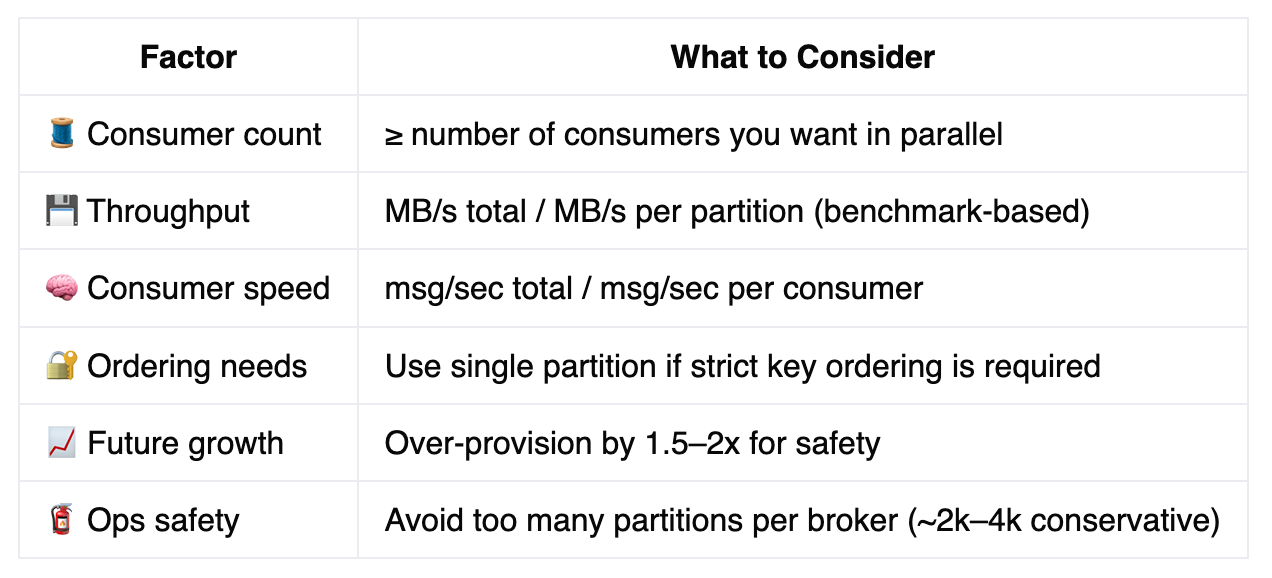
📊 Summary Cheat Sheet (Partition Sizing)
More like this
An introduction to the Paxos consensus algorithm for distributed systems, explained through the analogy of a chaotic Senate trying to agree on and pass a bill.
What I finally understood after six months of doing it wrong.
Three things stuck. Two of them surprised me.